DiskDog
The intelligent, cross-platform file manager built with Rust + Tauri. Organize, protect, and reclaim your disk — blazing fast.
Windows 10/11 · macOS & Linux coming soon
Built in Rust
Memory-safe, zero-crash
Native Speed
No JVM, no GC pauses
3 Platforms
Windows · macOS · Linux
7+ Languages
EN · ZH · JA · DE +3
Everything you need to master your files
Eight powerful modules, one unified interface.
Quick Launcher
Build a personal command center for files, apps, shell commands, and URLs. Smart auto-detect fills the form when you paste any path or URL. Organize entries with custom tags, sort by usage frequency, pin favorites to the top, schedule periodic execution, and launch multiple entries at once — all from a single keyboard-friendly panel.
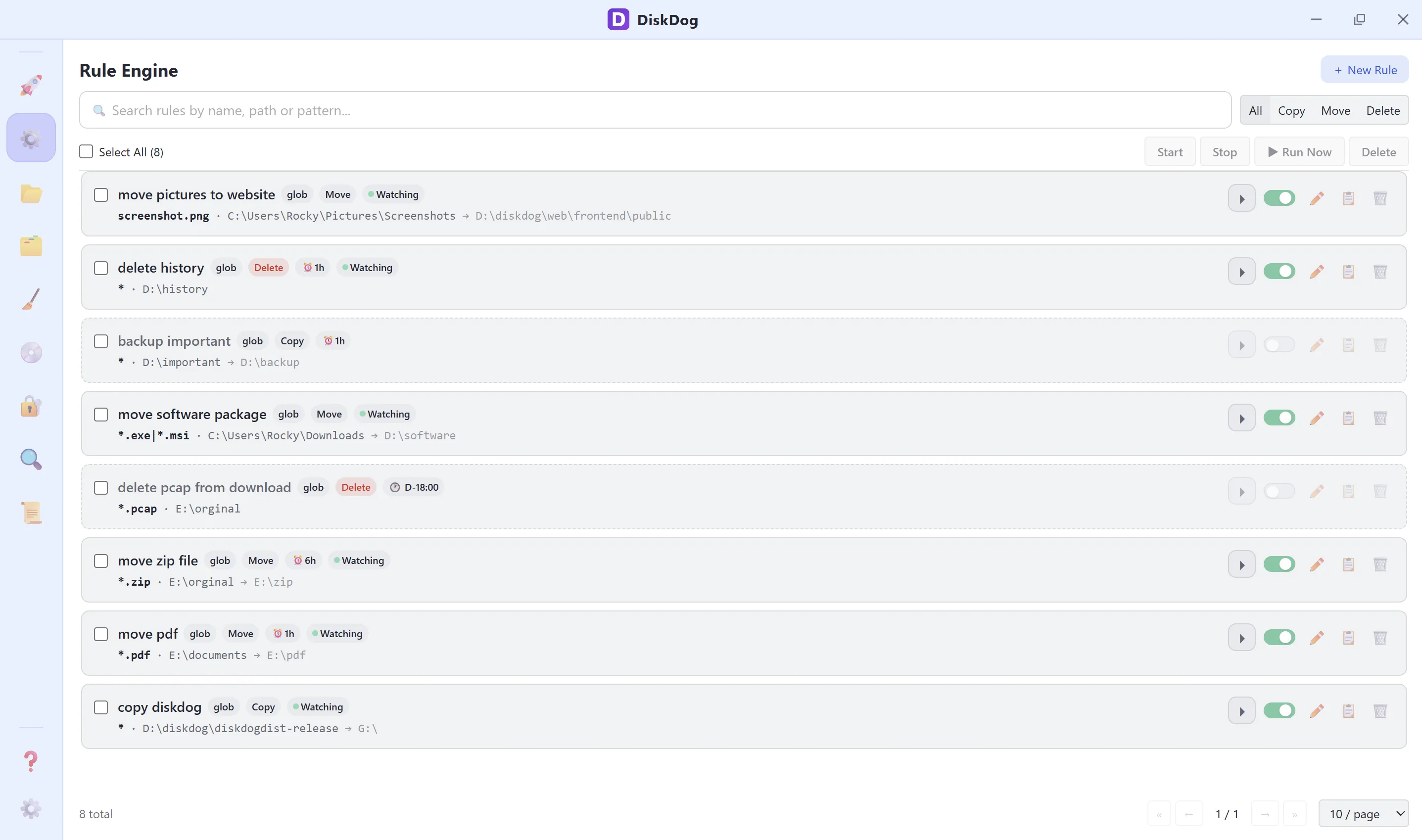
Rule Engine
Automate file workflows with glob/regex rules. Watch folders in real time — copy, move, or delete on match. Filter by time (last 24h/7d or custom range), file size (gt/lt/between), or filename. Hash-based dedup skips unchanged files. Scheduled, recursive, and tag-organized.
Virtual Directories
Create logical folder structures that reference files anywhere on disk — no copying, no moving. Link real directories for automatic sync, compute MD5 hashes for integrity checks, open files directly for printing, and search across all nested folders globally. Organize assets across projects without ever touching the originals.
File Organizer
Auto-sort files into named folders by extension, size, modified date, or sensitive keywords. Combine multiple dimensions for nested structures like 2026-05 / Images. Preview every move before executing, pick individual files or whole categories, and organize recursively across subfolders.
File Cleaner
Three cleanup tools in one: scan for zero-byte empty files, find cold files untouched for months and archive them, detect duplicate files by SHA-256 hash and reclaim wasted space — all with batch operations.
Disk Info
Full disk health dashboard: monitor usage, read/write speeds, and SMART data (wear leveling %, temperature, power-on hours) for every drive, and spot the largest files at a glance. Includes Find Copies — pick any file and locate byte-identical or visually similar copies across folders.
File Encryptor
AES-256-GCM encryption with Argon2id key derivation — military-grade security. Encrypt single files, batch-encrypt hundreds at once, or seal entire folders as a single .zip.enc archive. Secure erase included.
Similar Files
Detect near-duplicate files using SimHash fuzzy hashing — catches 95%-similar documents, images, and reports that exact-match tools miss. Read-only scan with adjustable similarity threshold for safe comparison before any manual action.
Real-World Use Cases
See how each module solves everyday file management challenges.
Tame Your Downloads Folder
Your Downloads folder has 2,000 mixed files. File Organizer auto-sorts them by extension into Images, Videos, Documents and Archives — or by modified date into year/month buckets. Stack dimensions for nested folders like 2026-05 / Images. Preview first, then execute in one click.
Monitor Disk Health & Find Copies
Your SSD is running hot and nearly full. Disk Info shows SMART wear leveling %, temperature, power-on hours, and the largest files on any drive. Suspect a file is duplicated across folders? Pick it as a seed in Find Copies to locate every byte-identical (SHA-256) or similar (SimHash) copy, then bulk-delete safely — the seed itself is always protected.
Protect Sensitive Documents
You need to share tax returns and contracts via cloud storage. Encrypt them with AES-256-GCM before upload, then securely erase the originals — recipients decrypt with the shared password.
Automate Repetitive File Workflows
Your camera uploads RAW files to a watched folder every night. A glob rule `*.CR3` automatically moves them to your NAS backup directory. Smart copy deduplication skips unchanged files. Scheduled rules run at specific times. Batch start/stop and tag-based filtering keep hundreds of rules organized.
Clean Up in Three Ways
After months of builds and downloads, your disk is cluttered. File Cleaner bundles three tools: scan recursively for zero-byte empty files, surface cold files untouched for months, and detect duplicate files by SHA-256 hash — then batch-delete or archive in one click.
Cross-Project Reference Library
You reference the same design assets across 10 projects. Virtual Directories let you group them into a logical folder without duplicating files on disk — drag, drop, done.
One-Click Access to Daily Tools
You open the same 8 files and scripts every morning. Pin them in Quick Launcher with smart auto-detect — paste a path, URL or command and it fills the form automatically. Group by type or custom tags, sort by usage frequency, and schedule periodic execution.
Compare Near-Duplicate Files Safely
You have 50 monthly report versions that are 95% identical. Similar Files detects them via SimHash and shows a side-by-side comparison — no files are touched, giving you full control over what to keep.
Simple, One-Time Pricing
Buy once, own forever. Includes 1 year of updates & priority support. No subscriptions, no hidden fees.
Free Trial
30 days, no credit card
- File Organizer
- Disk Info
- File Encryptor
- File Cleaner
- Similar Files
- 5Quick Launchermax 5
- 5Rule Enginemax 5
- 5Virtual Directoriesmax 5
Single
1 device
- ✓All modules fully unlocked
- ✓Lifetime license, no expiry
- ✓1 year of updates & support
- ✓Priority email support
- ✓Windows · macOS · Linux
- ✓30-Day Money-Back Guarantee
Multi-device
$47 / device · 20% off vs single
- ✓All modules fully unlocked
- ✓Lifetime license, no expiry
- ✓1 year of updates & support
- ✓Priority email support
- ✓Windows · macOS · Linux
- ✓30-Day Money-Back Guarantee
Each seat is an independent license key. Need a custom volume? Contact us.
Disk & File Management Essentials
Practical guides to help you understand storage, files, and security — all in one place.
How SSDs Differ from HDDs
SSDs use NAND flash with no moving parts — faster random reads, limited write cycles. HDDs use spinning platters — cheaper per GB, better for sequential writes.
Understanding Disk Fragmentation
HDDs slow down when files are split across non-contiguous sectors. SSDs don't fragment in the same way, but TRIM helps reclaim deleted blocks for performance.
What Is Disk Wear Leveling?
SSDs distribute writes evenly across all NAND cells to prevent any single cell from wearing out prematurely. Disk Guard monitors remaining life via S.M.A.R.T. data.
Cold Files and Storage Tiering
Files untouched for months are 'cold'. Moving them to slower, cheaper storage (external drives, NAS) frees fast SSD space without deleting anything.
File System Basics: NTFS, APFS, ext4
NTFS (Windows) supports permissions and journaling. APFS (macOS) is optimized for SSDs with copy-on-write. ext4 (Linux) is reliable and widely supported.
How to Read S.M.A.R.T. Data
S.M.A.R.T. attributes like Reallocated Sectors, Power-On Hours, and Wear Leveling Count reveal disk health. Values approaching threshold indicate imminent failure.
More articles coming soon. Content grows with the product.
Frequently Asked Questions
Everything you need to know before you download.
Is DiskDog free to use?
Yes — the first 30 days are completely free with no restrictions on any features. After the trial, Quick Launcher, Rule Engine, and Virtual Directories are limited to 5 items each. All other modules (Disk Info, File Organizer, Encryptor, File Cleaner, Similar Files) remain fully functional forever — a soft reminder banner is shown until you upgrade.
Which operating systems are supported?
Windows 10 (version 1803 / build 17134 or later) and Windows 11 are supported in v1.0. macOS and Linux versions are in development and will be released in a future update. Windows 7, 8, and 8.1 are not supported because they lack the WebView2 runtime required by Tauri.
What happens after the 30-day trial?
Quick Launcher, Rule Engine, and Virtual Directories will each be limited to 5 saved items. Disk Info, File Organizer, Encryptor, File Cleaner, and Similar Files have no functional limits — they continue to work fully with a small upgrade reminder. A one-time license key removes all restrictions permanently.
Why is it built with Rust?
Rust gives us memory safety without a garbage collector, meaning zero-crash reliability and native performance for heavy IO operations like scanning millions of files.
Does it collect any data?
No. The app runs entirely offline. No analytics, no crash reports sent anywhere, no network requests except for the optional update check which you can disable.
How secure is the file encryption?
We use AES-256-GCM (authenticated encryption) with Argon2id key derivation. Your password never leaves your device and the encrypted file is unreadable without it.
What's the difference between Find Copies and duplicate detection?
Duplicate detection (in File Cleaner) scans whole folders for groups of identical files. Find Copies (in Disk Info) starts from one file you choose as a seed and locates its copies across selected folders — either byte-identical via SHA-256 or visually similar via SimHash. The seed file is always protected from deletion.
Where do deleted files go?
By default DiskDog moves deleted files to your system Recycle Bin (Windows) or Trash, so you can restore them. You can switch to permanent deletion in Settings if you prefer. Secure erase in the Encryptor always overwrites data before removal.
Do Virtual Directories move my actual files?
No. Virtual Directories store only references (paths) to your files. The files stay exactly where they are on disk — only the logical grouping lives inside the app.
Can the Rule Engine delete files automatically?
Yes. Rules support Copy, Move, and Delete actions. For Delete rules, no target directory is needed. A confirmation warning is shown when creating delete rules.
How do I get updates?
The app checks for updates automatically on launch (can be disabled in Settings). You can also check manually via Settings → Software Update, or download directly from GitHub Releases.
Download DiskDog
Windows version now available for download. macOS and Linux coming soon.
macOS
macOS 12+ · Universal
Linux
Ubuntu / Debian · x64